
QUESTIONS? CALL: 08690 436 874

Barodian Advertising

Barodian Advertising

We Create Digital Solutions

8690 436 874 | 9227006011
Email: info@barodianadvertising.in

Barodian Advertising
Vadodara

Open in Google Maps
  • Home
  • About Us
  • Our Services
    • Digital Marketing
      • #1 Digital Marketing
      • Social Media Marketing
      • SEO ( Search Engine Optimization )
      • Google Ads Service Provider or Company in Vadodara
      • Email Marketing
      • Local SEO
      • Reputation Management
    • Web Design & Development
      • E-commerce Web Development
      • Website Design Services
      • Content Writing Services
      • Web Development
      • Digital Consultancy
      • Google My Business Management Services
      • Shopify Website Development
    • Out Door Marketing
      • Hoarding advertising
      • Auto Rickshaw & Bicycle Advertising In Vadodara , Gujarat , India
    • Others Services
      • Product Photography
      • 360 Virtual Tour & Video
      • Amazon Seller Account Management Services
      • Professional Video Editing Services
      • Reel Shooting Services
  • Portfolio
  • Careers
  • Contact Us
  • Get Social
FREEQUOTE
  • Home
  • Articles posted by ads
  • Page 6

Author: ads

Intel Plans 5G Laptops For 2019 Release, Partners With Microsoft, Dell, HP, Lenovo

  • 0
ads
Friday, 23 February 2018 / Published in Posts, Technology

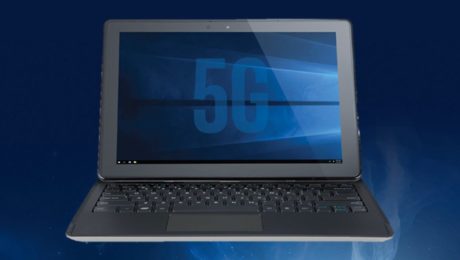
Intel is planning to prepare our computers for the upcoming telecommunication breakthrough, 5G. The company has partnered with Microsoft, Dell, HP, and Lenovo to bring Windows laptops with 5G connectivity through their XMM 8000 series commercial 5G modems. These laptops are expected to release sometime in the second of 2019.

The news came just a day after Qualcomm announced the list of carriers for the ARM-powered Windows 10 Always Connected PCs. At the MWC 2018 which is just around the corner, Intel will give a glimpse of the first 5G-connected Windows PC. But their 2-in-1 detachable concept, featuring an early 5G modem, would source its power from 8th Gen Intel Core i5 CPUs.

The 5G standard is designed to take our wireless connectivity experience to another level, exploring possibilities that are unheard in the current scenario. For instance, it could be used to provide an untethered VR experience on the go or let users download a 250MB file in seconds in a parking lot.

What 5G can do will be visible when it arrives in the real world. The hype was built in the case of the existing 4G LTE as well, which offers a theoretical download speed of 100 Mbps. But most of the networks around the world struggle to touch even 50 Mbps. According to a recent report by OpenSignal, countries like India have average 4G LTE speeds of just 6 Mbps.

In addition to their 5G dream, Intel will also showcase the first prototype laptop featuring an 802.11ax WiFi capabilities. Last month at CES, Asus announced their new 802.11ax WiFi router RT-AX88U with support for speeds up to 6Gbps.

The company will also demonstrate the eSIM functionality which is already supported by their enterprise and consumer PC modems released since September 2017.
How To Transfer Android, iOS Photos To Windows 10 Using Microsoft Photos Companion?

  • 0
ads
Friday, 16 February 2018 / Published in Technology

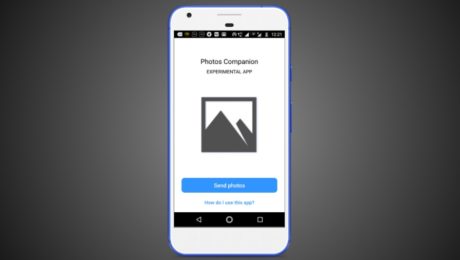
The new Photos Companion app is a fresh creation straight out of Redmond’s skunkworks division named Microsoft Garage. This experimental app is available for Android and iOS devices. What it does is it simplifies the transfer of images and videos from Android and iOS to Windows 10.

But wait, you can already sync your photos via OneDrive. What if you don’t have a Microsoft account? Although, being a Windows 10 user it’s quite unlikely. The Photos Companion app is designed to be used by people who don’t have a Microsoft account.

Similar to other apps like Share It and Xender, Microsoft’s Photos Companion lets you transfer photos and videos over WiFi. So, there isn’t the need for a high-speed internet connection, an advantage over cloud-based options.

How to use Photos Companion?

You can download Photos Companion from Google Play or App Store, depending on your operating system. The app works together with the Photos app in Windows 10 (version 2018.18011.13110.0 and above) and utilizes a feature that’s currently a part of the Photos app preview program.

Follow the steps:

  1. In Windows 10, open the Photos app > Three-dot button > Settings.
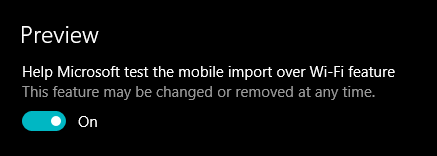
  2. Under Preview, turn on the toggle button that says “Help Microsoft test the mobile import over WiFi feature.” Restart the Photos app.
    Microsoft Photos Companion 1 Share Photos Videos
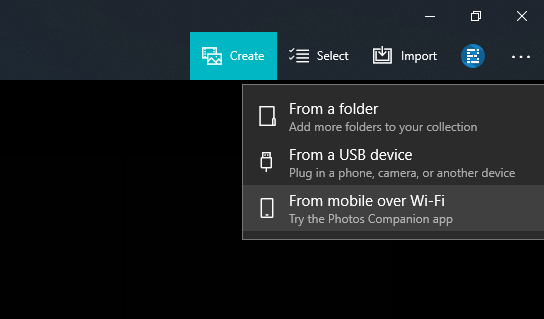
  3. Again in the Photos app, click the Import option in the top right corner and click “From mobile over WiFi” option in the drop-down menu.
    Microsoft Photos Companion 2 Share Photos Videos
  4. Now, make sure your phone and Windows 10 PC are connected to the same WiFi network. Also, network sharing should be turned on for the network. Otherwise, the sharing process won’t begin.
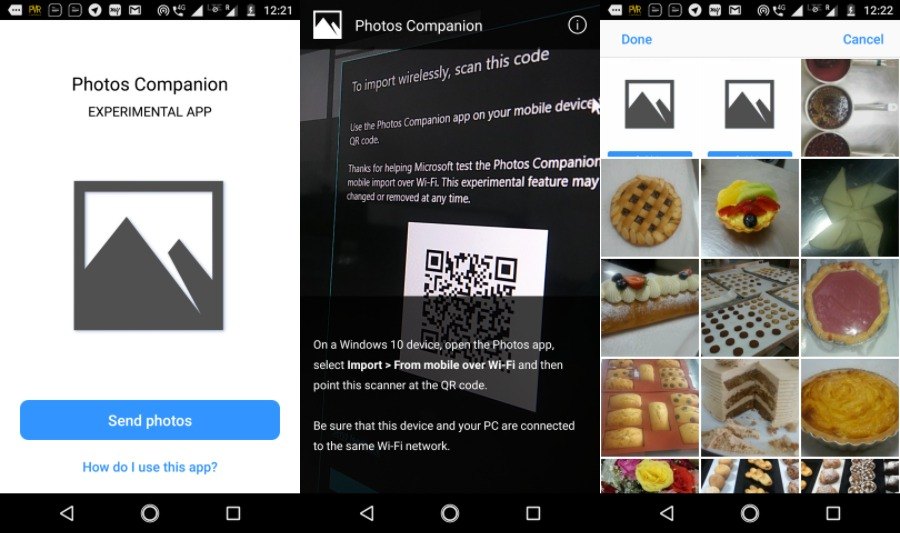
  5. On your Android or iOS device, tap the Send Photos button and scan the QR code from your PC.
  6. On the next screen, you can select the photos and videos you want to send to your Windows 10 PC over WiFi.
    Microsoft Photos Companion 4 Share Videos Photos
  7. Click Done to start the transfer.

Depending on the number and size of the photos and videos, the transfer process could take a few seconds to minutes.

Using Photos Companion is pretty quick when compared to OneDrive. Also, it can help you save on your data bills. Being all wireless, the photo-sharing app frees users from the hassles of connecting USB cable.

However, there are a couple of downsides. For instance, you have to scan the QR code every time you want to sync your photos. So, for some users, the app might not be their cup of tea. Another drawback is that the app works oneway, i.e., you can only transfer photos from Android and iOS to Windows 10, vice-versa isn’t possible.

Why Is Bluetooth Called “Bluetooth”? How Did It Get Its Name And Logo?

  • 0
ads
Sunday, 11 February 2018 / Published in Technology
Why Is Bluetooth Called “Bluetooth”? How Did It Get Its Name And Logo?

There are tons of stories how some of the world’s biggest companies and brands got their name. In the past, we’ve told you why Windows was named Windows. Or, more interestingly, why is JavaScript has the word Java in it. Today, I’m going to tell you the story behind the name of one more interesting technology — Bluetooth.


Bluetooth is a low-cost radio communication technology that allows short distance wireless networking between phones, computers, and other electronic devices. It was designed to support the networking of portable devices that are powered by batteries. A Bluetooth device makes use of radio waves and a Bluetooth product contains a small chip with a radio and software. When a network is established between different Bluetooth devices, one device acts as a master while others act as slaves.


But, how did Bluetooth get its uber-cool name?

History of Bluetooth and its name

I don’t think I’d be wrong to assume that you haven’t spent much time looking for the answer to this question. Some of you might be knowing that Bluetooth’s name has something to with a medieval Scandinavian king whose nickname was blátǫnn in Old Norse or Blåtand in Danish. These words mean Bluetooth–no cookies for guessing. The king was named Bluetooth as he had a dead tooth that looked blue.

But, why was this particular mid-90’s king’s name was chosen? What does his tooth have to do with a wireless technology standard?

In 1996, the companies like Intel, Nokia, and Ericsson were developing short-range radio technologies. Intel was working on a program called Business-RF; Ericsson was working on MC-Link; Nokia was working on Low Power RF. It was evident that having a single short-range standard would be much better than having 3 or more competing standards. So, these interested parties got together and created the Special Interest Group (SIG) for developing a common standard.

In the summer of 1997, Intel’s Jim Kardach went to a pub with Ericsson’s Sven Mattisson. There, they started talking about history and Mattisson mentioned a book he had recently finished reading. The book was called The Longships, and it was about the reign of Danish King Harald “Bluetooth” Gormsson. After this meeting, Kardach went home and read a book named The Vikings. In that book, he learned more about the king Bluetooth and how he united Scandinavia.


Later, he proposed that SIG should be called by the codenamed Bluetooth. “Bluetooth was borrowed from the 10th century, second King of Denmark, King Harald Bluetooth; who was famous for uniting Scandinavia just as we intended to unite the PC and cellular industries with a short-range wireless link,” he wrote in a column a decade later.

The codename Bluetooth was an instant hit in the marketing group and it was never changed.

What’s the story of Bluetooth’s logo?

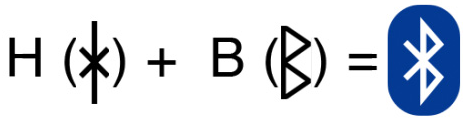
Well, as one might expect, the team again looked at its Nordic origins. The iconic Bluetooth logo is a combination of King Bluetooth’s initials (Hagall (ᚼ) and Bjarkan (ᛒ)) in The Younger Futhark, also called Scandinavian runes. It’s a runic alphabet in use from the 9th century.bluetooth logo origin

Instagram Now Shows Others When You Were Last Active, Here Is How To Turn It Off

  • 0
ads
Sunday, 11 February 2018 / Published in Technology
Instagram Marketing Company in vadodara , gujarat , india

Facebook Stories, a separate Messenger app, etc., are some of the irritating features that nobody asked from Facebook. In the latest addition, just like Messenger and WhatsApp’s last seen activity of users, Instagram users can now see the last seen activity of other users.

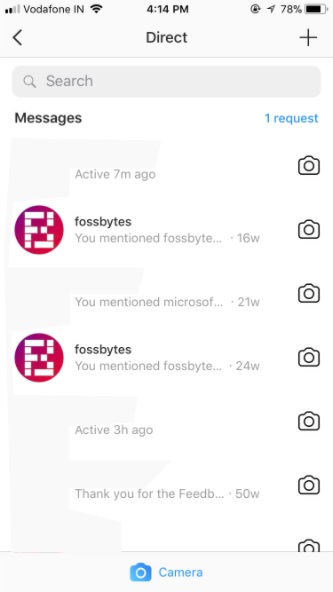
The new Instagram last active feature can be spotted by visiting your direct messages. There, you can see small timestamps showing the last time someone you chatted with visited Instagram. The timestamps let you see up to the minute someone used the service.

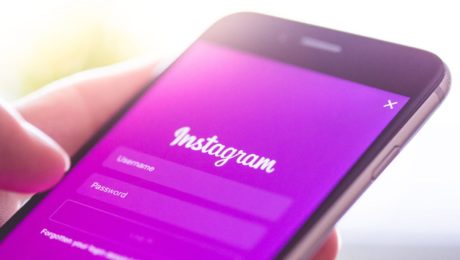
Here’s how it looks:

instagram last seen feature

This move should be seen in the light of another recent launch by Instagram in the form of its standalone messaging app. Given Facebook’s past track record, Instagram can force users to install it to access direct messages. Meanwhile, you can disable this last active option and protect your privacy. Let’s see how to do it:

Disable Instagram’s Last Active Feature

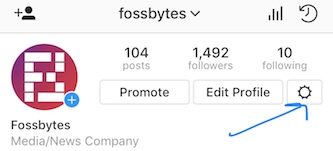
To disable the feature, open your Instagram profile page. There, tap the gear/settings icon to open the settings.

instagram last seen feature disable

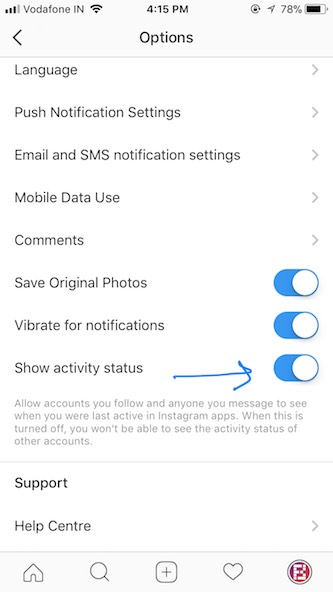
After accessing the settings page, scroll down to “Show activity status.” If you’re running an updated Instagram app, it should be active by default. Tap on the toggle to disable the feature. That’s all you need to do.

instagram last seen feature disable

Note: After disabling the feature and hiding your last seen, you won’t be able to see the last active status of other users as well.

WhatsApp Business App for SMEs Is Now Available to Download in India.

  • 0
ads
Sunday, 11 February 2018 / Published in Technology
Barodian Advertising

Just days after its initial rollout, the WhatsApp Business app has now debuted in India. The standalone app offers a simple tool for small businesses to let them communicate with their clients and customers in an easy way. Facebook-owned WhatsApp announced the plans to kick off its WhatsApp for Business initiative back in September last year and launched a pilot by partnering with companies such as BookMyShow, Netflix, and MakeMyTrip. The new app, for small businesses, arrived first in a handful of markets, including Indonesia, Italy, Mexico, the UK, and the US, on Friday. Interestingly, the app was initially tested in India and Brazil ahead of its public release.

The WhatsApp Business app is now available for free download via Google Play in India. It is compatible with devices running Android 4.0.3 and above. A version with similar features is also expected to be available for iOS devices in the coming future.

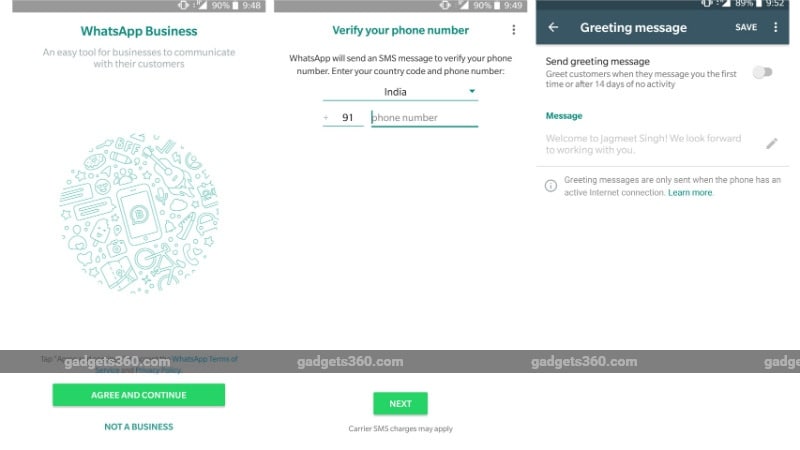
Targeted at small businesses, the WhatsApp Business app allows companies to connect with their customers and be a part of the messaging platform that has over 1.3 billion users worldwide. Unlike the original WhatsApp app, the business-centric offering allows businesses to create their own profiles with information such as business description, email, or store addresses, and website. It also provides smart messaging tools to let businesses use quick replies and give fast answers to frequently asked questions. The app also has options to send greetings messages to new customers and set away messages when the companies are busy. Further, there are metrics such as the number of messages read and WhatsApp Web support to let companies send and receive messages directly through a desktop.whatsapp business screenshots 235718 105703 3018 WhatsApp Business appAlongside delivering the features to enable corporate communication for small businesses, WhatsApp is in plans to mark some businesses as Confirmed Accounts over time. Citing a study conducted by Morning Consult, more than 80 percent of small businesses in India and Brazil consider WhatsApp helps them communicate with customers and grow their business. As many as 84 percent of SMBs (Small and Medium Businesses), particularly from India, think that WhatsApp helps them communicate with customers, while 80 percent of Indian SMBs believe that WhatsApp helps them grow their business, as per the data provided by the company last week.

In terms of some major similarities with the original WhatsApp, the WhatsApp Business app allows businesses to set privacy for their profile photo, about information, and status as well as lets them block any of their contacts and enable read receipts. The app also has a live location feature that helps companies share their live location with their clients and customers. It additionally allows businesses to make voice and video calls. Notably, the app offers end-to-end encryption for all the messages and calls it circulates to restrict any third-party access.

We’ve reached out WhatsApp for more clarity regarding the rollout and will update this space accordingly.

As per the official data provided in February last year, WhatsApp has over 200 million monthly active users in India. The instant messaging platform is making things difficult for its rival by introducing compelling features such as Delete for Everyone, YouTube integration, and Notification Channel support for Android Oreo devices. Moreover, it is exploring new avenues and is apparently even set to integrate a UPI payments feature in the near future.

Google To Bring Android Messages To Your Computer’s Web Browser (APK Teardown)

  • 0
ads
Sunday, 11 February 2018 / Published in Mobile
Google Ads Marketing Barodian Advertising

While Google might be excelling in its flagship offerings like search, video, maps, etc., its messaging game plan remains a mystery. Its plethora of apps for different purposes have failed to gain an iMessage or WhatsApp-like popularity. This is surprising as iMessage is one of the main reasons why many people choose to stay inside Apple’s closed garden.

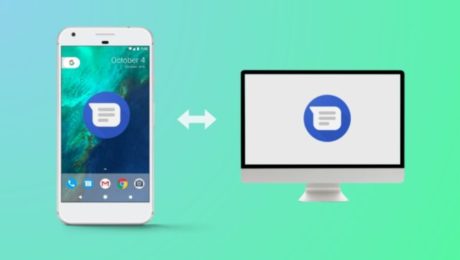
In a move that might bring a glint in the eyes of Android enthusiasts, Google is reportedly planning to bring the ability to send text messages from your computers. Soon, you’ll be able to use Android Messages app on desktop Firefox, Chrome, and other web browsers.

This has been revealed after some code digging done (or APK teardown) by Android Police. Some intriguing findings suggest features like sending messages from PC, scanning QR code, connecting PC app to phone, multiple browser support, etc.

What makes it more interesting is the possibility of advanced features that are offered by RCS, including sending messages over WiFi, read receipts, seeing real-time responses, etc. The future update can also open gates to send payments via text messages, request money, etc.

It’s worth mentioning that these expected features should be taken with a grain of salt. APK teardowns are necessarily speculative, and it could turn out to be wrong on some occasions. In case the features mentioned above make it to the public, we’ll let you know.

  • 4
  • 5
  • 6

Recent Posts

  • Digital Marketing for Clothing Brands in Vadodara

    Digital Marketing for Clothing Brands in Vadodara

    How Barodian Advertising Helps Fashion Brands D...
  • Digital Marketing for Resorts, Hotels & Restaurants in Vadodara

    Digital Marketing for Resorts, Hotels & Restaurants in Vadodara

      Why Barodian Advertising is the Right Gr...
  • Business Reel Shoot in Vadodara – Boost Your Brand with Powerful Visuals

    🎥 Business Reel Shoot in Vadodara – Boost Your ...
  • Real estate shoot in vadodara

    Best Real Estate Shoot Company in Vadodara: Who’s Turning Properties into Showstoppers?

    Best Real Estate Shoot Company in Vadodara: Who...
  • Digital Marketing in July 2025: What’s New, What’s Next

    As we enter the second half of 2025, digital ma...

Follow Us

Barodian Advertising

Who We Are??

Barodian Advertising is a leading Digital Marketing Company In Vadodara Gujarat India We Also Provide Social Media Marketing , SEO ,E-Commerce Web Design company in Vadodara-Baroda, Gujarat,India that helps businesses build sustainable, meaningful relationships with clients through brand engagement online. Their results have brought about raising the bar of their standards and the markets they serve through social media marketing, search engine optimization, email marketing, digital marketing, web designing, and graphic designing.

Barodian Advertising was founded in 2015. For the past years, their team of professionals has been carrying out and completing projects with a passion for digital performance and creative solutions to clientele in different parts of India and worldwide.

Recent Updates

  • Digital Marketing for Clothing Brands in Vadodara

    Digital Marketing for Clothing Brands in Vadodara

    How Barodian Advertising Helps Fashion Brands D...
  • Digital Marketing for Resorts, Hotels & Restaurants in Vadodara

    Digital Marketing for Resorts, Hotels & Restaurants in Vadodara

      Why Barodian Advertising is the Right Gr...

GET IN TOUCH

8690 436 874 | 922 700 6011
Email: in**@*****************ng.in

Barodian Advertising
299/A/9 , GIDC Estate,
Nr.BSNL Office , Makarpura,
Vadodara-390010

Open in Google Maps

  • GET SOCIAL
Barodian Advertising


© 2026 All rights reserved. Buy Barodian Advertising | Vadodara.SitemapRss Feed

TOP