

QUESTIONS? CALL: 08690 436 874

Barodian Advertising

Barodian Advertising

We Create Digital Solutions

8690 436 874 | 9227006011
Email: info@barodianadvertising.in

Barodian Advertising
Vadodara

Open in Google Maps
  • Home
  • About Us
  • Our Services
    • Digital Marketing
      • Digital Marketing
      • Social Media Marketing
      • SEO
      • Google Ads
      • Email Marketing
      • Reputation Management
    • Web Design & Development
      • E-Commerce Website Development
      • Website Design Services
      • Web Development
      • Shopify Website Development
      • Google My Business Management Services
    • Out Door Marketing
      • Hoarding advertising
      • Auto Rickshaw
      • Brochure Design
      • Offset Printing
    • Others Services
      • Product Photography
      • 360 Virtual Tour & Video
      • Amazon Seller Account Management Services
      • Professional Video Editing Services
      • Reel Shooting Services
      • Printing Services
  • Careers
  • Blogs
  • Contact Us
    • Get Social
Company Profile
  • Home
  • Articles posted by ads
  • Page 5

Author: ads

Instagram is Working on a New ‘Join Chat’ Sticker for Stories

  • 0
ads
Friday, 03 May 2019 / Published in Posts, Social Media Marketing, Technology

It seems that it’s not only Facebook’s main app that’s putting more focus on private groups – over on Instagram, reverse engineering expert Jane Manchun Wong has uncovered a new ‘Join Chat’ sticker option which would enable Stories viewers to join a private chat group, direct from a Story.

As you can see here, the ‘Join Chat’ sticker prompts the user to add a note on what the chat is about, with the lower note saying: ‘People who view your story can request to join this group chat’.

Along with Facebook more broadly, Instagram has been putting increased emphasis on messaging, with more than half of the app’s users now also using Instagram Direct. Instagram Direct has also proven to be a strong driver of engagement and connection on the platform, with around 85% of the messages shared on Instagram distributed among the same three friends, as opposed to broader groups.

This new option looks to put more emphasis on this, prompting private group discussion and sharing, which aligns with the above-noted trends, while also sparking interest in yet another aspect of the Instagram experience.

For brands, if this is indeed launched, it could provide another way to build stronger community connection, and bring your biggest advocates closer by sharing exclusive content and/or seeking consultation. That could be particularly helpful on Instagram, given the power of influencer marketing on the platform – if you can build stronger connection with your top followers, that could give your brand building efforts a significant boost.

There’s no word as yet from Instagram as to whether this feature will be released, but we’ll keep you updated as we hear.

Follow Andrew Hutchinson on Twitter

10 Surprising Stats You Didn’t Know About Content on LinkedIn [Infographic]

  • 0
ads
Friday, 03 May 2019 / Published in Social Media Marketing

In its recent quarterly update, Microsoft, the parent company of LinkedIn, reported that the professional social network continues to see ‘record levels of engagement‘, with on-platform sessions growing by 24%.

LinkedIn engagement has been on the rise for some time – but where, exactly, is that growth coming from and what types of content are generating more interest on the site?

Delving deeper into this, LinkedIn has published a new infographic, which outlines a range of updated engagement stats, which may help you better plan your platform strategy.

Among the data points listed:

  • Top publishers have seen an average 120% growth in Page followers YoY
  • Video is the content type most likely to spark conversation
  • Messages sent have increased 35% YoY

LinkedIn Adds New Ad Targeting Options, Including Lookalike Audiences

  • 0
ads
Tuesday, 02 April 2019 / Published in digital Marketing, Posts, Social Media Marketing

After recently launching a new Interest Targeting option for LinkedIn ads, which is based on the content people engage with on the platform, LinkedIn is now broadening its ad targeting toolset even further, with the addition of three new options to help hone in on your specific target audience.

The three new options being launched are ‘lookalike audiences’, ‘audience templates’, and the addition of Microsoft Bing search data to beef up interest targeting. Here’s how each will work.

Lookalike Audiences

Digiday reported back in January that LinkedIn was working on its own variation of Lookalike Audiences, and now, LinkedIn has officially confirmed the addition.

As per LinkedIn:

“LinkedIn’s lookalike audiences combine the traits of your ideal customer with our rich member and company data to help you market to new professional audiences similar to your existing customers, website visitors and target accounts. Since these members are already on LinkedIn, they’re in the right professional mindset to engage and respond to your brand.”

Similar to how the process works on other platforms, Lookalike Audiences will enable you to upload an email list from your CRM, for example, or a list of people who have visited your website, then LinkedIn’s system will match those details against its database to come up with a new audience of users who share similar traits.

LinkedIn Lookalike Audiences

Lookalike audiences have proven highly effective on other platforms, taking some of the effort out of identifying and focusing on the right audience. If the system is able to detect relevant, similar traits, this can be a great way of reaching new people who are likely to be interested in your offerings.

This may actually be even more potent on LinkedIn, as it will be able to detect new user segments based on job title and position information, which could help ensure you get your ads in front of the exact right decision makers, and capitalize on industry trends and shifts.

LinkedIn says that the option has proven effective in its initial trials:

“Customers in our pilot were able to improve their campaign reach by 5-10x while still reaching the kind of high-quality audiences that matter most to their organizations.”

This could become a key consideration for all LinkedIn ad campaigns.

Audience Templates

Audience Templates, meanwhile, aim to make it easier for people who are less certain about their target market, or have less training data to go on, to reach relevant users on the platform.

LinkedIn's Audience Templates ad targeting option

As you can see here, the Audience Templates option – shown on the right of the screenshot – will enable advertisers to search for a market segment that relates to their offering. You just enter in the type of people you’re trying to reach and LinkedIn will provide a match based on its system detail.

At this stage, there are around 20 predefined B2B audiences to choose from, though LinkedIn notes that is expanding.

Facebook’s Added a Secret Dark Mode to Messenger – Here’s How to Find it

  • 0
ads
Tuesday, 05 March 2019 / Published in Posts, Social Media Marketing

After testing it out for the last few months, Facebook is now rolling out its new ‘Dark Mode’ for Messenger – but they’ve hidden the function, Easter egg style, behind an in-app emoji trick.

Here’s how you can activate the new function – and a disclaimer, this may not be available to all users as yet (I tried it on two devices, on one, it worked, on the other it didn’t).

First, ensure the Messenger app on your device is updated to the latest version.

Next, go into any chat and head into that specific conversation’s settings by tapping on the name of the person, or people, in the discussion at the top of your Messenger window.

Within the chat settings, change the chat emoji to the moon image. Now, head back into the chat and send the same moon emoji as a message.

Messenger Night Mode

For some users, this is enough to activate Dark Mode (you can see the prompt in the third screenshot above noting that ‘You’ve found dark mode’), but for others, you may have to actually double-tap the moon emoji within the chat. I had to tap on the moon emoji a few times – eventually, it sparked a flood of moons falling down the screen, then the dark mode prompt appeared.

Once you’ve ‘found’ dark mode, you can tap on the prompt to head to settings and activate it.

Messenger dark mode screenshots

As noted, this may or may not be active for all users at this stage – some are saying it’s not active for them, and as noted, I tried it on a couple of devices with differing results.

Either way, it likely does mean that Facebook will roll out dark mode to all users soon, not just those who know this trick. Facebook first previewed Messenger dark mode as part of its broader app revamp announcement last May, while code hacker Jane Manchun Wong shared screenshots of the option in development back in October.

Pinterest Adds More Ways for Businesses to Share and Promote their Products

  • 0
ads
Tuesday, 05 March 2019 / Published in Social Media Marketing

Ahead of a potential IPO later in the year, Pinterest is ramping up its eCommerce tools, this time through the addition of new product catalogs and personalized shopping recommendations, in order to maximize business potential.

First, in addition to the ‘More like this’ option beneath each Pin, which uncovers visually similar items, Pinterest is also adding a ‘More from [brand]’ option, which will showcase a broader range of product Pins from the same business.
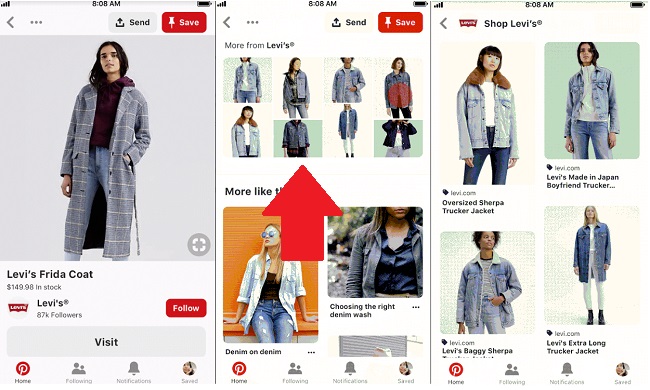
As you can see in the above example, when you scroll down from a Pin, there’ll be a new option, where available, to also tap on the ‘More from [brand]’ list, which will showcase similar items, but confined to that provider. That’ll definitely prove popular with brands – at present, the ‘More like this…’ option can take users away from their offerings, even if they might have similar product in their catalog that would fit the bill. This option will enable businesses to keep users around for longer, and help facilitate brand loyalty on the platform.

Next up, Pinterest is also adding in new personalized shopping recommendations:

“Alongside style, home, beauty and DIY boards, you’ll see in-stock ideas related to what you’ve been saving, to match your style. Just click “more ideas” then the shopping tag to start shopping ideas picked for you. Tap + to quickly add the Pin to your board, or click the Pin to go straight to checkout on the retailer’s site.”

Pinterest 'More ideas' option

The addition will provide more ways for Pinners to find available products similar to what they’re interested in, with direct buying options, making it easier to get more shopping ideas.

Pinterest will also now enable brands to upload their full catalog to the platform, and turn their products into dynamic Product Pins. This compliments the platform’s recent announcement of automated ‘Shop the Look’ Pins, which are able to identify products within Pins and connect them to buying options. Uploading your product catalog will ensure your products show up for more of these automated recommendations, boosting your business potential on the platform.

In addition to this, Pinterest is also making its Shopping Ads available to all businesses through its self-serve ad tool, and it’s expanding its ‘Shopping search’, in order to showcase more products to buy for related on-platform queries.

As noted, the updates expand Pinterest’s eCommerce potential, adding in more ways for users to find, and buy, relevant items, related to their search history, their interests and specific brands. That will make the platform more inviting for businesses – already, research has shown that Pinterest drives far higher purchase intent than other platforms, with some 90% of Pinnersusing the platform to plan for or make purchases.

Pinterest may have relatively fewer users (250 million) than other social platforms – but Pinterest has repeatedly stated that its, in fact, not a social network. It’s become a ‘discovery engine’, ‘a catalog of ideas’, and in that sense, Pinterest, in many ways, is in a league of its own – a sort of middle ground between Google search and Amazon product listings, but more driven by your personal preferences and interests.
Facebook Begins Rolling Out New Dashboards Tracking Time Spent in App

  • 0
ads
Saturday, 24 November 2018 / Published in digital Marketing, Posts, Social Media Marketing

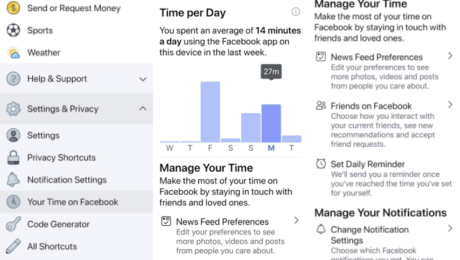
It’s taken a while, but Facebook is now rolling out its promised ‘time spent’ dashboard within its main app, enabling users to track the time they’re active on Facebook each day, and set prompts to limit their use.

Facebook time spent dashboard

As you can see from the above screenshots, the new dashboard is available within the functions listing, and through it, you can see your total time spent, set daily reminders, and change your settings to make better use of your time.

The options are very similar to what Instagram launched last week, which are part of the broader ‘digital wellbeing’ push within tech circles that’s been initiated in response to a range of reports about the potential negatives of overuse of digital platforms.

MARKETING DIVE

Inside Starbucks’ secretive, ad-free Facebook community for fall enthusiasts

What exactly is the Leaf Rakers Society? Learn how Starbucks built a 26,000-member community of die-hard Pumpkin Spice Latte fans.

LEARN MORE

Facebook itself commissioned a report which found that passive engagement on social can lead to negative mental health impacts. That finding puts Facebook, as a business, in a tough position – on one hand, it needs to make you come back to the platform and use it as much as possible to boost its usage stats (and attract more ad dollars), but on the other, there are user welfare concerns with the same.

In this respect, Facebook’s new tracking tools seem somewhat like a red flag being waved by a matador – yes, they seek to address the core issue, but not really.

As noted by Techcrunch:

“Facebook and Instagram’s versions are particularly toothless. There are no options to force you to ease off your usage, just a quick daily limit notification to dismiss. iOS 12’s Screen Time at least delivery’s a weekly usage report by default so the feature finds you even if you don’t go looking for it. And Android’s new Digital Wellbeing dashboard is by far the most powerful, graying out app icons and requiring you to dig into your settings to unlock apps once you hit your daily limit.” 

Really, the apps themselves are not responsible for how you use your time – if you choose to spend your free hours mindlessly scrolling through Facebook, that’s up to you. The providers can give you access to tools to highlight the potential problems with this, but they can’t necessarily enforce any ‘rules’ around use. It is possible that they could do more, as TechCrunch notes, and Facebook could also provide more insight into how, specifically, you’re spending your time in its apps, which may help to guide your usage. But the tracking dashboards are, looking at the other side of the argument, at least a first step.

So long as people go looking for them. Will you check out your Facebook usage stats?

I’m willing to bet the majority of users of both apps won’t bother – because who wants to know how much time you’ve wasted? Who wants to be shown the hours they could have spent doing something more productive? Hence, the red flag analogy – yes, Facebook is providing tools to help, but really, they’re somewhat meaningless in the broader scheme. You’ll keep on using Facebook and Instagram the same way regardless.

That’s not to denigrate Facebook for making the effort – and who knows, maybe they will prove beneficial, and will limit our time spent, and the negative impacts. But I wouldn’t count on it.

Facebook’s Bringing Ads to Facebook Stories, Expanding Reach Options

  • 0
ads
Thursday, 26 July 2018 / Published in digital Marketing, Networking, Posts, Social Media Marketing

As you’re no doubt aware, Facebook Stories aren’t as popular as Instagram Stories, the most successful version of the format which Facebook copied from Snapchat (at least in western markets). But, even so, Facebook itself remains convinced that Stories is the format of the future, including on their main platform.

At their F8 developer conference earlier this year, several Facebook executives, including Mark Zuckerberg, noted that the Stories format is on track to overtake the News Feed as the most popular social sharing option, and that that will happen sometime this year.

Given that Instagram Stories is now at 400 million users, and WhatsApp ‘Status’ is up to 450 million, the growth of the option is clearly evident – but Facebook Stories, at 150 million daily actives, is still lagging behind.

But that slower rate of growth doesn’t appear to have dampened any enthusiasm for the potential of Facebook Stories in Menlo Park, with The Social Network releasing a new blog post promoting the potential of the format for businesses.

Facebook Stories examples

As noted by Facebook:

“The rise of stories is clear: people want fast, immersive and fun ways to share photos, videos and text with their friends and family – and stories offer just that. People use stories to share and discover content they’re interested in for movements as big as Pride and moments as small as the coffee they’re drinking. We designed stories on our platforms to fulfill people’s need to interact and share in engaging and playful ways on the vertical screen.”

I did laugh a little at the ‘we designed’ note – though probably not as funny to those at Snap Inc.

In the post, Facebook outlines the potential of Stories for brands, and their capacity to help marketers connect with their audiences, noting that a third of the most viewed stories on Instagram are from businesses.

But ads in Stories are where Facebook suggests there’s the most brand potential.

“Businesses are already seeing results using ads in Instagram Stories. For example, Tropicana ran video ads in Instagram Stories for its summertime product promotion campaign, achieving an 18-point lift in ad recall and 15-point lift in purchase intent among males. OpenTable used ads in Instagram Stories to drive online restaurant reservations, resulting in a 33% lower cost per reservation compared to other ad formats. And Overstock ran video ads in Instagram Stories to acquire new customers and increase sales, and generated an 18% higher return on ad spend and a 20% decrease in cost per acquisition.”

Right now, however, you can’t run ads on Facebo

Instagram Adds Video Chat, New Explore Section, Topic Channels: Here’s How To Use Them

  • 0
ads
Thursday, 28 June 2018 / Published in digital Marketing, Mobile, Posts, Technology

Just a week ago, Instagram launched its new video sharing platform ‘IGTV.’ Now the company is rolling out new features like group video chat, new camera effects with custom AR filters, and redesigned explore section. So, let’s tell you about them brief:

Instagram’s Video Chat: How to use it?
Instagram Group Video Call

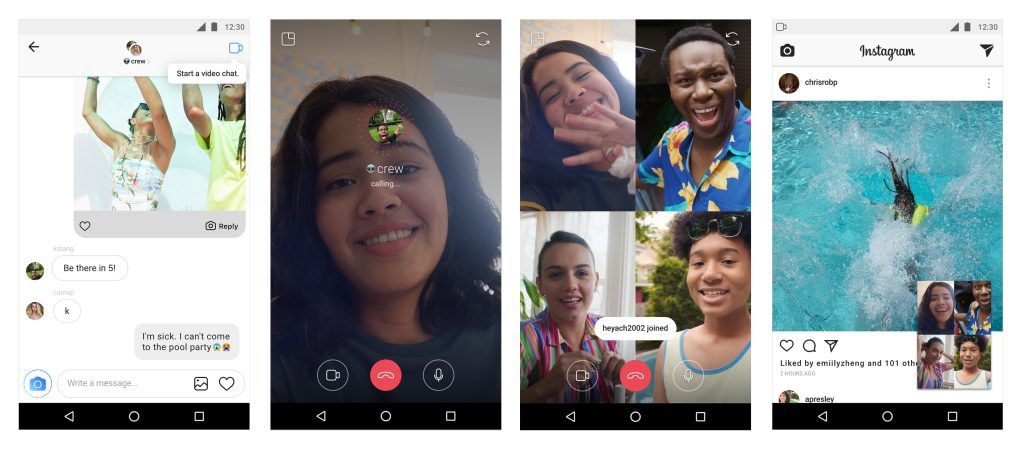
The video chat option is available in the Direct Messaging section. To start a one-on-one video call, open an existing message or start a new thread. Then tap the new camera icon at the top right.

You can also make a group video call with up to four persons by creating a group that includes the recipients you would like to chat with. While chatting, you can minimize the window to multitask on Instagram by viewing photos, sending texts on DM, or post stories.

The camera icon turns blue when a video chat goes active and for joining an ongoing conversation, just tap the blue camera icon. Tapping on the red phone icon will end the calls.

In case you want to prevent a user from video calling you, blocking them would do the trick. You can also choose to mute users if you do not wish to receive notifications from them.

Explore Section: What’s new? What’s changed?

Instagram gets millions of visitors each day who check out the Explore tab to discover interesting picture and motion content. Now the platform has made it easier to find out specific content by creating topic channels.

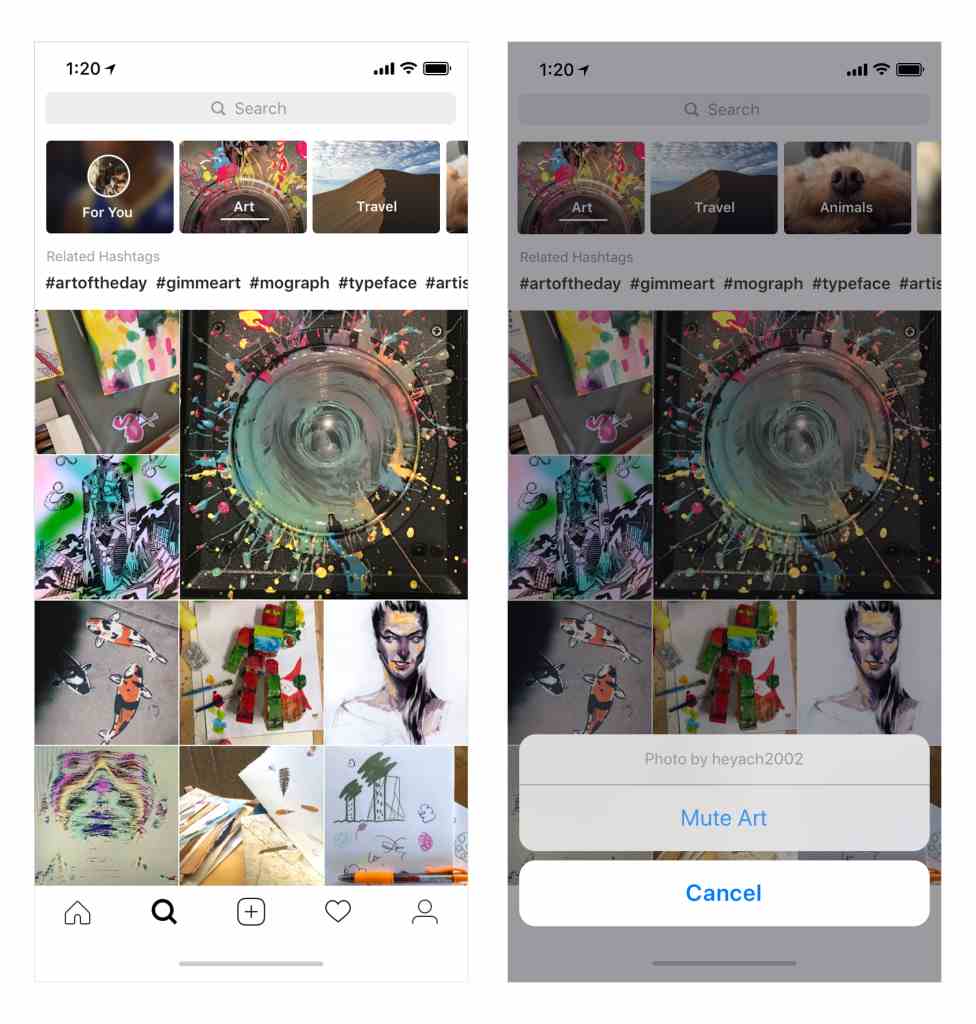
On opening the Explore tab, you will see a list of channels which will show contents of a specific genre. The first one is “For You” that offers curated posts based on your personal interests.
Instagram Explore Section

There are other topic channels such as Food, Humor, Fashion, Beauty, Art, etc., and a list of hashtags to explore more specific and trending content topics.

In case you want to remove a channel from the list, just tap and hold the channel and select ‘Mute’ from the popup menu. It will stop showing content from that specific channel, and you can unmute it at any time by visiting the end of the list.

New Camera Effects

Instagram AR filters

Another interesting update is the custom AR filters for Stories. For the first time, Instagram allowed third parties to create filters and they have been launched by celebrities Ariana Grande, Baby Ariel, YouTuber Liza Koshy, and famous channels like BuzzFeed and NBA.

These new Instagram filters can be used to augment a picture or selfie with objects and virtual effects. In case you come across a new AR filter being used on an image or video in other users’ stories, you will be offered an option to add it to your effects toolkit and try it out.

Instagram is also addressing the issue of online harassing and bullying on the platform by launching a new “bullying filter.” Based on machine learning tech, this filter will hide language that may seem offensive in nature.


CREDIT : FOSSBYTES

Baba Ramdev’s Patanjali Launches Kimbho Messaging App To Challenge WhatsApp: Download Here

  • 0
ads
Thursday, 31 May 2018 / Published in digital Marketing, Posts, Technology

After shocking the Indian smartphone owners by launching the “swadeshi” SIM card in partnership with BSNL, Yoga guru Baba Ramdev’s Patanjali has launched a messaging app named Kimbho.

Kimbho has been created by Patanjali to compete with Facebook-owned WhatsApp. This desi app’s tagline is “Ab Bharat Bolega,” which translates into “Now India Will Speak” in English.

Launching the app, Patanjali’s spokesperson SK Tijarawala called it India’s #SwadeshiMessagingplatform. “Now Bharat will speak. After launching SIM cards, Baba Ramdev has launched a new messaging application called Kimbho. Now Whats App will be given competition,” he added.

tijarawala sk@tijarawala

अब भारत बोलेगा…!
पूज्य @yogrishiramdev @Ach_Balkrishna के मार्गदर्शन में उनके शिष्य नवदीक्षित साधुओं और राष्ट्रनिष्ठ विशेषज्ञों ने #स्वदेशी तकनीक से इजाद कर बनाया यह #KIMBHO एप#भारत #स्वाभिमान
Patanjali’s new app to challenge WhatsApp @bst_official https://www.aninews.in/news/national/general-news/patanjalis-new-app-to-challenge-whatsapp201805301944510002/ …

9:21 PM – May 30, 2018

Patanjali’s new app to challenge WhatsApp

New Delhi [India], May 30 (ANI): Yoga guru Ramdev on Wednesday launched a new messaging application called Kimbho under his flagship company Patanjali.

aninews.in

  • 39

  • 32 people are talking about this

Twitter Ads info and privacy

Baba Ramdev’s messaging app contains all the necessary features one will expect from a modern chatting application.

One can use it to chat privately as well as create groups. There’s a functionality of making phone and video calls as well. Other features include audio, photo, video, location, GIF, doodle, and sticker sharing.

Kimbho is available both on Google Play Store and Apple App Store. The app’s description further mentions that it’s “100 % FREE, SECURE and No Ads.” It also says that every message is encrypted by AES and “we save no data on our servers or cloud.”

10 Biggest Features Of New Gmail For Web You Need To Use

  • 0
ads
Monday, 30 April 2018 / Published in Posts, Technology

The much-awaited makeover of Gmail web interface is here after five long years. Google has not only redesigned the look but also added several new functionalities. However, you will get to the see the new features only if you opt-in for the new Gmail layout.

While there are a bunch of features that are neat but many of them are minor ones. So let’s take a look at the ones that are actually useful.


10 Best New Gmail Features for Web

1. Snooze Mails

You can finally snooze your emails Like Google’s ‘Inbox’ and make them disappear for the time being. Just select the Snooze option (that looks like a clock) and have them redelivered to you at a suitable date or time when you can reply to it. This feature will save you from the regret of not replying to an important mail.

Snooze mail on Gmail

2. Smart Reply

Anyone who has used the Gmail app for mobile must be familiar with the Smart Reply. For the uninitiated, this new Gmail feature suggests you quick answers that you can send back just by clicking on them, saving the unnecessary keystrokes when all you need to do is confirm a meeting time or acknowledge a mail.

Smart reply gmail


3. Sidebar with multiple apps

The new Gmail update brings a brand new sidebar on the right-hand side where you can tap on the tiny icons to pull up your Google Calendar, add important notes in Keep, assign Tasks or access another Gmail add-ons that you have installed.

sidebar

Google Tasks

The most notable addition to the new Gmail features is Google Tasks. Now you will be able to drag emails to the Tasks section to set new to-do list based on the email. It lets you create multiple lists which can be rearranged by date or manually. Other features include assigning subtasks, dates and additional notes to the tasks.

Google tasks

4. Clickable attachments

Gmail’s new feature will save your time by displaying the attachments inline so that you can open them without opening the mail. It’s a great feature if you know that the only useful thing in the email is the attachment. Be it a Microsoft Word document, PDF or photos, all of them appears beneath the email subject in your inbox.

Clickable attachments

5. Unsubscribing unwanted emails

All of us receive unwanted newsletters that you didn’t sign up for, which can be quite annoying. Thankfully, the new Assistive Unsubscribe tool can learn which emails you check regularly and which ones you ignore. Based on your interaction, this new Gmail feature will recommend unsubscribing such emails with a quick option on your display for the same.


6. Inline buttons

Four inline action buttons now pop up on the messages that allow you to take quick actions for individual mail with a single:

  • Archive
  • Delete
  • Mark it read or unread
  • Snooze it

These buttons are quite helpful in handling separate emails. Earlier, if you wanted to delete a single message from inbox, you would have to check a box next to the mail and then click again on the delete button. The new inline delete button lets you delete on a single click.

Inline buttons

7. Risk warnings

Google has not only redesigned the look but also revamped its security by adding an ability to detect potentially harmful emails with new security features. Gmail web now displays a risk warning text – “This message seems dangerous” and offer a ‘Delete Now’ button. It will prevent users from clicking malicious links in messages and phishing activities.

Risk warning mail

Upcoming best features of Gmail for web

While some of the new Gmail features have already been released, there are many that will be rolled out in the coming weeks. The features mentioned below are yet to be released.

8. Confidential mode

The confidential mode is probably the best new Gmail feature which will allow you to send self-destructing emails. You can pick an expiration date after which the email and its attachments will no longer be available. In addition to that, you can revoke a sent mail after which it won’t be readable by the recipient.

Messages sent in the confidential mode cannot be forwarded, copied or downloaded by the recipient. In case you are sending any sensitive information, there is an option to include a password that the recipient will need to enter to open the message.

9. Nudging

We often forget to reply to emails or think that we did, when we actually didn’t. The new Gmail update will offer a solution to your forgetfulness through Nudge feature. It reminds you to follow up and respond to messages that haven’t been replied to. All the incoming and outgoing messages will remind you to take action on it after a set amount of time has lapsed.

Nudge

10. Offline mode

There will be a new native offline support that will allow you to search, write, delete, and archive mails up to 90 days and work on them easily even if the Wi-Fi connectivity is unavailable. It will be quite helpful in places that have low network connectivity by helping them to save their work.

  • 1
  • 2
  • 3
  • 4
  • 5
  • 6

Recent Posts

  • Best Digital Marketing Agency in Vadodara | Barodian Advertising

    Best Digital Marketing Agency in Vadodara to Gr...
  • Social Media Marketing Agency in Vadodara

    Best Social Media Marketing Agency in Vadodara | Barodian Advertising

    Social Media Marketing Agency in Vadodara In to...
  • Digital Marketing Agency in Vadodara | Best Digital Marketing Company

    Why Your Business Needs a Digital Marketing Age...
  • Lead Generation Agency in Vadodara

    Lead Generation Agency in Vadodara | High-Quality Business Lead Generation

    Lead Generation Agency in Vadodara In today’s c...
  • Real Estate Lead Generation Agency in Vadodara | Barodian Advertising

    Real Estate Lead Generation Agency in Vadodara | Digital Marketing for Builders

    Real Estate Lead Generation Agency in Vadodara ...

Follow Us

Barodian Advertising

Who We Are??

Barodian Advertising is a leading Digital Marketing Company In Vadodara Gujarat India We Also Provide Social Media Marketing , SEO ,E-Commerce Web Design company in Vadodara-Baroda, Gujarat,India that helps businesses build sustainable, meaningful relationships with clients through brand engagement online. Their results have brought about raising the bar of their standards and the markets they serve through social media marketing, search engine optimization, email marketing, digital marketing, web designing, and graphic designing.

Barodian Advertising was founded in 2015. For the past years, their team of professionals has been carrying out and completing projects with a passion for digital performance and creative solutions to clientele in different parts of India and worldwide.

Recent Updates

  • Best Digital Marketing Agency in Vadodara | Barodian Advertising

    Best Digital Marketing Agency in Vadodara to Gr...
  • Social Media Marketing Agency in Vadodara

    Best Social Media Marketing Agency in Vadodara | Barodian Advertising

    Social Media Marketing Agency in Vadodara In to...

GET IN TOUCH

8690 436 874 | 922 700 6011
Email: in**@*****************ng.in

Barodian Advertising
299/A/9 , GIDC Estate,
Nr.BSNL Office , Makarpura,
Vadodara-390010

Open in Google Maps

  • GET SOCIAL
Barodian Advertising


© 2026 All rights reserved. Buy Barodian Advertising | Vadodara.SitemapRss Feed

TOP