Snapchat has released the latest version of its



We Create Digital Solutions
8690 436 874 | 9227006011
Email: info@barodianadvertising.in
Barodian Advertising
Vadodara

Are you considering your Facebook strategy for the year ahead? Want to learn the key facts before executing your campaign?
The team from Oberlo share the stats you need to know in this infographic.
Here’s a summary of what you’ll learn:
Check out the infographic below for more detail.

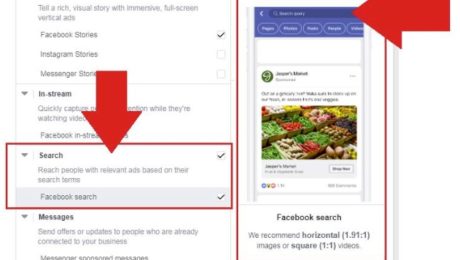
Last December, TechCrunch reported that Facebook was re-launching its search ads after a five year absence. And this week, access to Facebook’s new search ad option appears to have been significantly expanded, with a range of Facebook advertisers reported that ‘Search’ is now an option within their Ad Placements tools.
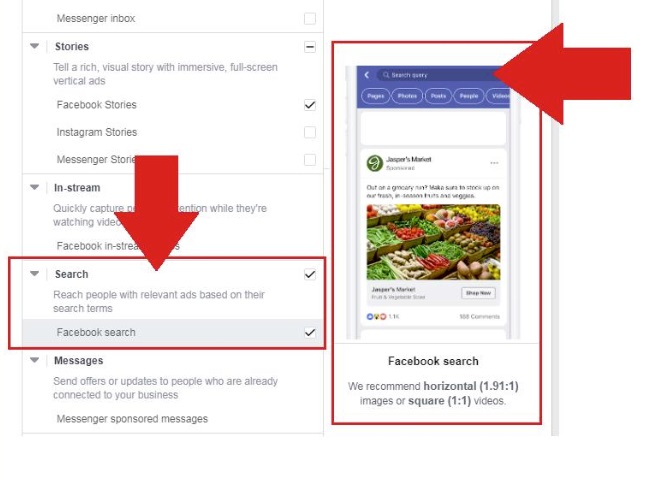
As you can see in this example, which was shared by digital marketing consultant Steven Johns, search is now showing for more businesses in their ad placement options, while there’s also a basic example of how the new search ads look and work. When someone searches for a related term on Facebook, you can target that query, and have your ad shown in the results, similar to Google search ads.
As noted, Facebook originally launched search ads back in 2012, but abandoned them shortly after. This re-launched version is different to that initial offering, but focuses on the same functionality – in TechCrunch’s reportlast year, it noted that
“Advertisers will be able to extend their existing News Feed ads to the new “Search” placement through the Facebook Ads Manager, similar to how they’d pick Facebook Audience Network or Instagram. No video ads will be allowed, and search ads won’t appear on desktop. Marketplace search ads will appear on iOS and Android, while Facebook search ads are only testing on Android. For now, advertisers won’t pick specific keywords to advertise against, and instead may appear in search terms related to auto or retail topics.”
Facebook would appear to have evolved its search ad options from this, but the basic functionality remains the same.
How effective search placements will be will obviously be relative to the product/service you’re offering, and the specifics of your ad listing.
It’s also important to consider what users are searching for on the platform. Back in 2016, Facebook said that it was facilitating over 2 billion searches per day, a significant volume to consider, but we haven’t seen an update on that stat since, and with social media usage behaviors changing, and Facebook searches, you would assume, being less about specific products and services than the same on Google, the opportunities are more limited.
That doesn’t mean they won’t be effective, but there are some key considerations to keep in mind around the potential of Facebook search ad placements, and whether they might work for your business.
It’s not clear how much Facebook has expanded its search ad placements as yet (we’ve asked and will update if we get more info), but it’s another option to consider in your marketing strategy, in order to maximize the reach and resonance of your Facebook campaigns.
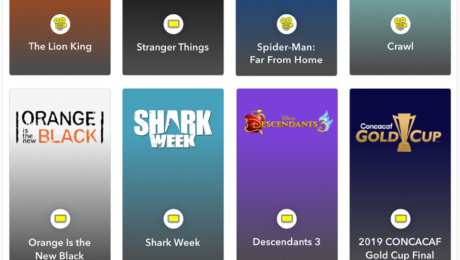
‘Snap Chatter’ monthly report, which highlights all the key topics and trends that are seeing significant increases in mention volume among the app’s users.
And given Snapchat’s popularity with younger audiences, the Snap Chatter reports can be a great indicator of rising trends in general – the monthly listings include key topics of focus in different regions, trending entertainment, celebrities and catchphrases.
You can get a full rundown of each element on Snapchat’s business s
ite, or check out the infographic overview below.
Snapchat has released the latest version of its

Just a week ago, Instagram launched its new video sharing platform ‘IGTV.’ Now the company is rolling out new features like group video chat, new camera effects with custom AR filters, and redesigned explore section. So, let’s tell you about them brief:
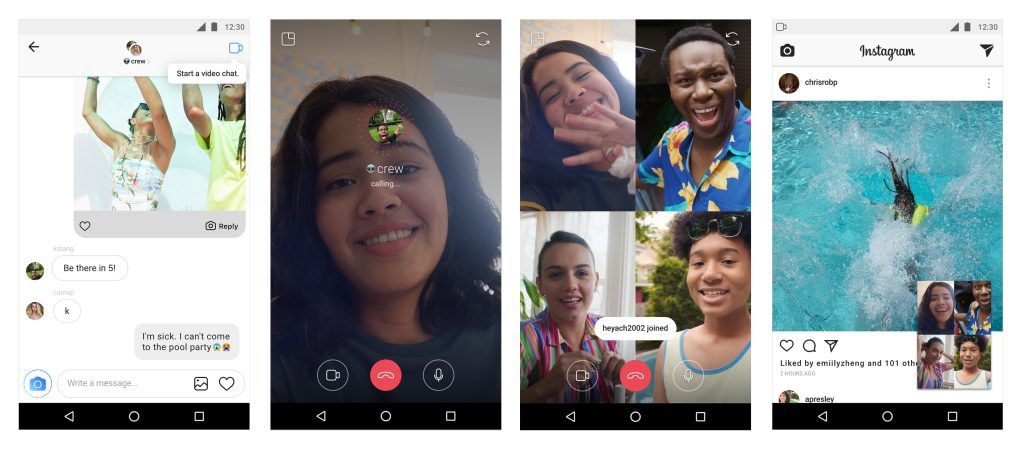
The video chat option is available in the Direct Messaging section. To start a one-on-one video call, open an existing message or start a new thread. Then tap the new camera icon at the top right.
You can also make a group video call with up to four persons by creating a group that includes the recipients you would like to chat with. While chatting, you can minimize the window to multitask on Instagram by viewing photos, sending texts on DM, or post stories.
The camera icon turns blue when a video chat goes active and for joining an ongoing conversation, just tap the blue camera icon. Tapping on the red phone icon will end the calls.
In case you want to prevent a user from video calling you, blocking them would do the trick. You can also choose to mute users if you do not wish to receive notifications from them.
Instagram gets millions of visitors each day who check out the Explore tab to discover interesting picture and motion content. Now the platform has made it easier to find out specific content by creating topic channels.
On opening the Explore tab, you will see a list of channels which will show contents of a specific genre. The first one is “For You” that offers curated posts based on your personal interests.
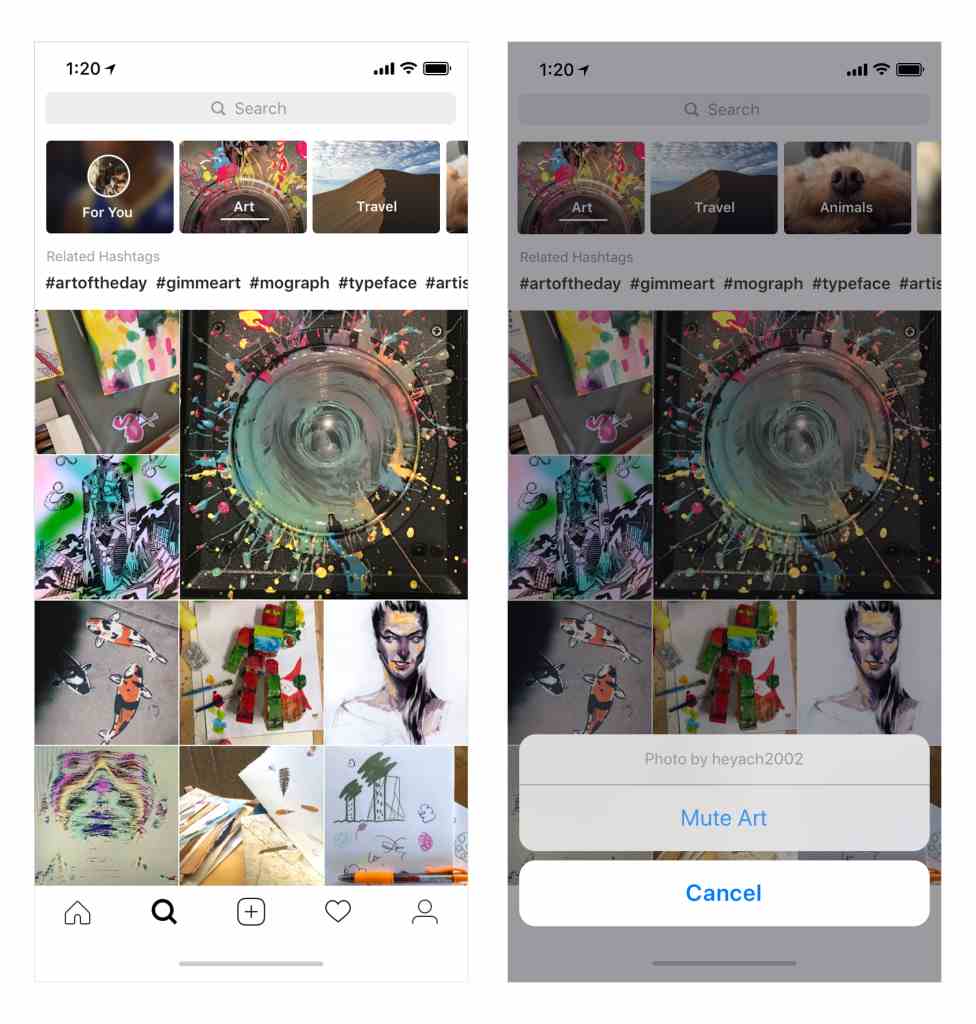
There are other topic channels such as Food, Humor, Fashion, Beauty, Art, etc., and a list of hashtags to explore more specific and trending content topics.
In case you want to remove a channel from the list, just tap and hold the channel and select ‘Mute’ from the popup menu. It will stop showing content from that specific channel, and you can unmute it at any time by visiting the end of the list.

Another interesting update is the custom AR filters for Stories. For the first time, Instagram allowed third parties to create filters and they have been launched by celebrities Ariana Grande, Baby Ariel, YouTuber Liza Koshy, and famous channels like BuzzFeed and NBA.
These new Instagram filters can be used to augment a picture or selfie with objects and virtual effects. In case you come across a new AR filter being used on an image or video in other users’ stories, you will be offered an option to add it to your effects toolkit and try it out.
Instagram is also addressing the issue of online harassing and bullying on the platform by launching a new “bullying filter.” Based on machine learning tech, this filter will hide language that may seem offensive in nature.
CREDIT : FOSSBYTES

While Google might be excelling in its flagship offerings like search, video, maps, etc., its messaging game plan remains a mystery. Its plethora of apps for different purposes have failed to gain an iMessage or WhatsApp-like popularity. This is surprising as iMessage is one of the main reasons why many people choose to stay inside Apple’s closed garden.
In a move that might bring a glint in the eyes of Android enthusiasts, Google is reportedly planning to bring the ability to send text messages from your computers. Soon, you’ll be able to use Android Messages app on desktop Firefox, Chrome, and other web browsers.
This has been revealed after some code digging done (or APK teardown) by Android Police. Some intriguing findings suggest features like sending messages from PC, scanning QR code, connecting PC app to phone, multiple browser support, etc.
What makes it more interesting is the possibility of advanced features that are offered by RCS, including sending messages over WiFi, read receipts, seeing real-time responses, etc. The future update can also open gates to send payments via text messages, request money, etc.
It’s worth mentioning that these expected features should be taken with a grain of salt. APK teardowns are necessarily speculative, and it could turn out to be wrong on some occasions. In case the features mentioned above make it to the public, we’ll let you know.