
QUESTIONS? CALL: 08690 436 874

Barodian Advertising

Barodian Advertising

We Create Digital Solutions

8690 436 874 | 9227006011
Email: info@barodianadvertising.in

Barodian Advertising
Vadodara

Open in Google Maps
  • Home
  • About Us
  • Our Services
    • Digital Marketing
      • #1 Digital Marketing
      • Social Media Marketing
      • SEO ( Search Engine Optimization )
      • Google Ads Service Provider or Company in Vadodara
      • Email Marketing
      • Local SEO
      • Reputation Management
    • Web Design & Development
      • E-commerce Web Development
      • Website Design Services
      • Content Writing Services
      • Web Development
      • Digital Consultancy
      • Google My Business Management Services
      • Shopify Website Development
    • Out Door Marketing
      • Hoarding advertising
      • Auto Rickshaw & Bicycle Advertising In Vadodara , Gujarat , India
    • Others Services
      • Product Photography
      • 360 Virtual Tour & Video
      • Amazon Seller Account Management Services
      • Professional Video Editing Services
      • Reel Shooting Services
  • Portfolio
  • Careers
  • Contact Us
  • Get Social
FREEQUOTE
  • Home
  • BLOG & STORIES
  • Technology
  • How To Transfer Android, iOS Photos To Windows 10 Using Microsoft Photos Companion?

How To Transfer Android, iOS Photos To Windows 10 Using Microsoft Photos Companion?

ads
Friday, 16 February 2018 / Published in Technology

How To Transfer Android, iOS Photos To Windows 10 Using Microsoft Photos Companion?

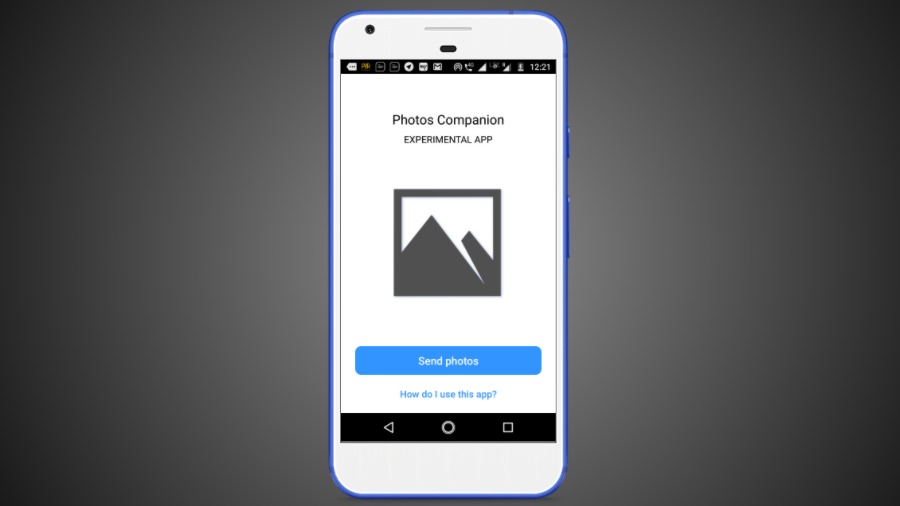
The new Photos Companion app is a fresh creation straight out of Redmond’s skunkworks division named Microsoft Garage. This experimental app is available for Android and iOS devices. What it does is it simplifies the transfer of images and videos from Android and iOS to Windows 10.

But wait, you can already sync your photos via OneDrive. What if you don’t have a Microsoft account? Although, being a Windows 10 user it’s quite unlikely. The Photos Companion app is designed to be used by people who don’t have a Microsoft account.

Similar to other apps like Share It and Xender, Microsoft’s Photos Companion lets you transfer photos and videos over WiFi. So, there isn’t the need for a high-speed internet connection, an advantage over cloud-based options.

How to use Photos Companion?

You can download Photos Companion from Google Play or App Store, depending on your operating system. The app works together with the Photos app in Windows 10 (version 2018.18011.13110.0 and above) and utilizes a feature that’s currently a part of the Photos app preview program.

Follow the steps:

  1. In Windows 10, open the Photos app > Three-dot button > Settings.
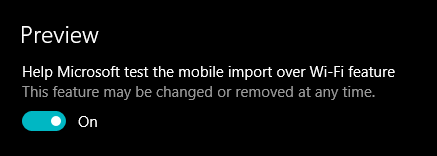
  2. Under Preview, turn on the toggle button that says “Help Microsoft test the mobile import over WiFi feature.” Restart the Photos app.
    Microsoft Photos Companion 1 Share Photos Videos
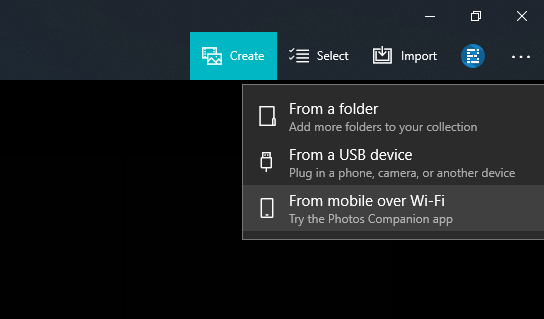
  3. Again in the Photos app, click the Import option in the top right corner and click “From mobile over WiFi” option in the drop-down menu.
    Microsoft Photos Companion 2 Share Photos Videos
  4. Now, make sure your phone and Windows 10 PC are connected to the same WiFi network. Also, network sharing should be turned on for the network. Otherwise, the sharing process won’t begin.
  5. On your Android or iOS device, tap the Send Photos button and scan the QR code from your PC.
  6. On the next screen, you can select the photos and videos you want to send to your Windows 10 PC over WiFi.
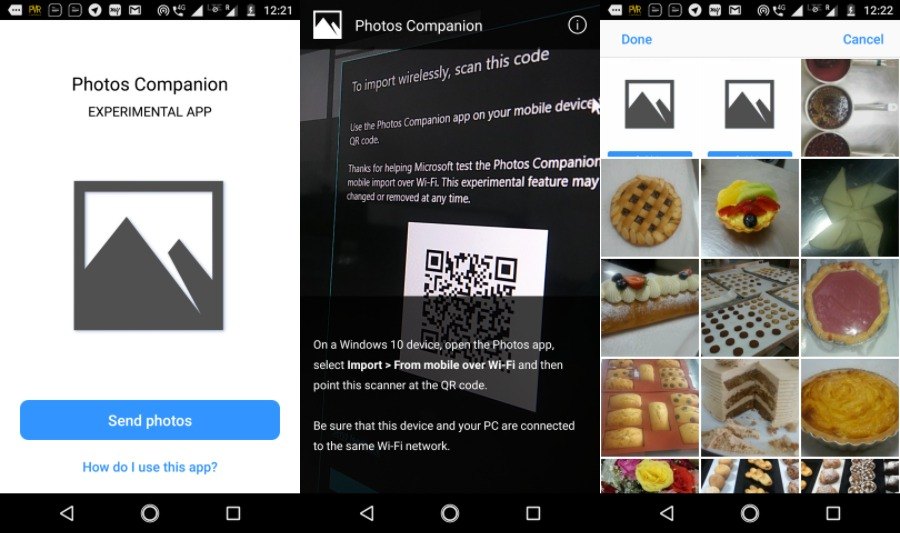
    Microsoft Photos Companion 4 Share Videos Photos
  7. Click Done to start the transfer.

Depending on the number and size of the photos and videos, the transfer process could take a few seconds to minutes.

Using Photos Companion is pretty quick when compared to OneDrive. Also, it can help you save on your data bills. Being all wireless, the photo-sharing app frees users from the hassles of connecting USB cable.

However, there are a couple of downsides. For instance, you have to scan the QR code every time you want to sync your photos. So, for some users, the app might not be their cup of tea. Another drawback is that the app works oneway, i.e., you can only transfer photos from Android and iOS to Windows 10, vice-versa isn’t possible.

What you can read next

10 Biggest Features Of New Gmail For Web You Need To Use
Instagram Adds Video Chat, New Explore Section, Topic Channels: Here’s How To Use Them
Facebook Releases Express Wi-Fi App on Play Store

Leave a Reply Cancel reply

Your email address will not be published. Required fields are marked *

73 − 72 =
Powered by MathCaptcha

Recent Posts

  • Business Reel Shoot in Vadodara – Boost Your Brand with Powerful Visuals

    🎥 Business Reel Shoot in Vadodara – Boost Your ...
  • Real estate shoot in vadodara

    Best Real Estate Shoot Company in Vadodara: Who’s Turning Properties into Showstoppers?

    Best Real Estate Shoot Company in Vadodara: Who...
  • Digital Marketing in July 2025: What’s New, What’s Next

    As we enter the second half of 2025, digital ma...
  • seo company in vadodara

    SEO COMPANY IN VADODARA GUJARAT

    ...
  • 5 Free SEO Tools Every Business Owner Should Be Using

    In today’s digital landscape, a strong on...

Follow Us

Barodian Advertising

Who We Are??

Barodian Advertising is a leading Digital Marketing Company In Vadodara Gujarat India We Also Provide Social Media Marketing , SEO ,E-Commerce Web Design company in Vadodara-Baroda, Gujarat,India that helps businesses build sustainable, meaningful relationships with clients through brand engagement online. Their results have brought about raising the bar of their standards and the markets they serve through social media marketing, search engine optimization, email marketing, digital marketing, web designing, and graphic designing.

Barodian Advertising was founded in 2015. For the past years, their team of professionals has been carrying out and completing projects with a passion for digital performance and creative solutions to clientele in different parts of India and worldwide.

Recent Updates

  • Business Reel Shoot in Vadodara – Boost Your Brand with Powerful Visuals

    🎥 Business Reel Shoot in Vadodara – Boost Your ...
  • Real estate shoot in vadodara

    Best Real Estate Shoot Company in Vadodara: Who’s Turning Properties into Showstoppers?

    Best Real Estate Shoot Company in Vadodara: Who...

GET IN TOUCH

8690 436 874 | 922 700 6011
Email: in**@*****************ng.in

Barodian Advertising
299/A/9 , GIDC Estate,
Nr.BSNL Office , Makarpura,
Vadodara-390010

Open in Google Maps

  • GET SOCIAL
Barodian Advertising


© 2026 All rights reserved. Buy Barodian Advertising | Vadodara.SitemapRss Feed

TOP